Use Amap . It is the map Chinese drivers actually use, it has an English mode, and — critically — it carries the Chinese names of everything, which is what is written on the station sign, the bus stop, the road and the ticket gate. Your usual map app can get you to the right neighbourhood and then leave you standing on the wrong side of a barrier. If you are on an iPhone, Apple Maps is a workable second choice in the big cities, but Amap is the one I would install.
Why the map you have is not enough
Two separate problems. The first is availability: Google's mapping services do not function normally in mainland China, so if your travel app of choice is built on them, it will be somewhere between useless and wrong for the whole trip. Apple Maps is a partial exception because it uses Chinese map data on iPhones, and it is genuinely fine in Beijing, Shanghai or Chengdu — but it thins out quickly once you leave the big cities, which on my routes is the entire point.
The second problem is more subtle and more annoying. Even a map that shows the right road is not much use if the name it searches for is a transliteration, because the sign on the ground will be in characters. Amap gives you both, and lets you switch which one leads. That is what makes the difference at a station entrance with a train leaving in forty minutes.
What Amap does well
Road navigation is what it was built for, and it is very good — real-time traffic that reflects what drivers actually meet, including the congestion around Chinese holidays, which is a category of its own. Public transport planning is equally strong: put in a destination and it will lay out the metro lines, the transfers and the walking, with the exits to aim for. If you are taking buses, its live tracking is the tool that makes them usable, because it shows your dot moving towards the stop when the announcements are not in English.
It also has ride-hailing built in, which means you can arrange the whole journey in one app if you prefer not to install DiDi as well. And it lists attractions, opening hours and reviews alongside the map, which quietly makes it a research tool too.
Setting it up properly
Switch the interface to English in the settings — it is not on by default and the app is much less friendly until you do. Download the offline map of the province you are travelling in before you leave the city, because the plateau has long stretches with no signal at all, and a road that stops rendering is not much help when you are deciding which fork to take.
Then do the small thing that pays off all week: find your hotel, your station and one or two landmarks, and save them. Standing in a doorway in the rain trying to type a Chinese address you cannot read is a solvable problem, and this is the solution.
Questions I get on this one
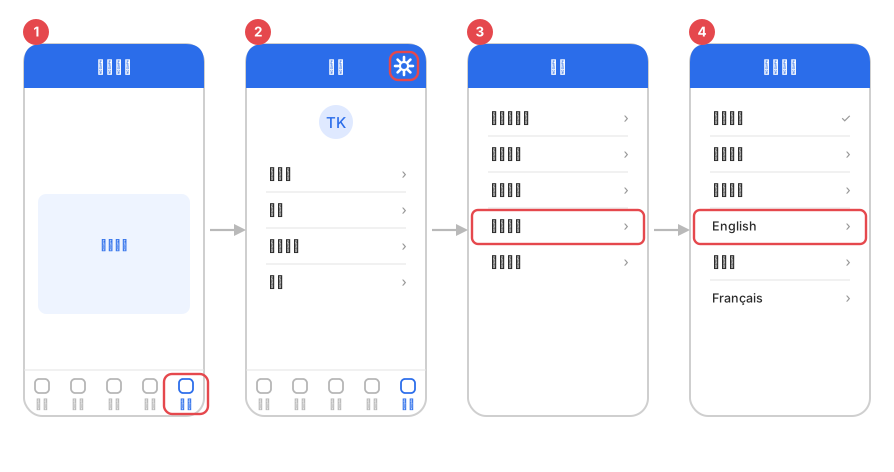
- Tap 我的 (Me) — the bottom-right tab.
- Tap the gear at the top right: 设置 (Settings).
- Scroll down to 语言设置 (Language).
- Pick English from the list, then close and reopen the app — the change only takes effect after a restart.
Is Amap available in English?
What about Baidu Maps?
Will Google Maps work at all?
Do I need offline maps?
Does the driver use the same app I do?
From driving these roads constantly, with the map open. App versions and English coverage change; if a setting has moved, tell me. Related: metro and buses · taxis · staying connected · all essentials