Get Alipay and WeChat Pay onto your phone before you fly, register with your passport, and link an international card. Do it at home, where the verification reaches your own number and you can ring your own bank if something is refused. If neither app will take your card, there is a third worth trying: TenPayGo, which registers with an email address alone.
Why the timing matters more than the choice of app
Almost nothing about paying here is difficult. The difficulty is entirely about when you do the setup. Registration sends a verification code and it has to reach you; card checks and bank calls are far easier in your own country, in your own time zone, with your own bank a phone call away. Do it before you leave and China becomes a country where you barely touch your wallet. Leave it until you land and it can cost you an afternoon at a hotel desk.
What you actually need
- A phone that will work on a Chinese network — worth checking with your carrier before you go.
- Your passport. Foreign visitors register on a passport, not a Chinese ID, and both apps will ask you to photograph the photo page.
- An international card enabled for overseas transactions. A quick call to your bank to say you are travelling saves a lot of grief later.
You do not need a Chinese bank account, and you do not need a Chinese phone number — your own number is enough for the verification. If a card of yours is refused, that is usually your own bank's fraud controls rather than the Chinese app.
Switching them to English
Both apps open in Chinese, and the language setting is a few taps deep — the one moment you have to read characters. Here is the path for each; after this you will rarely see a Chinese menu again.
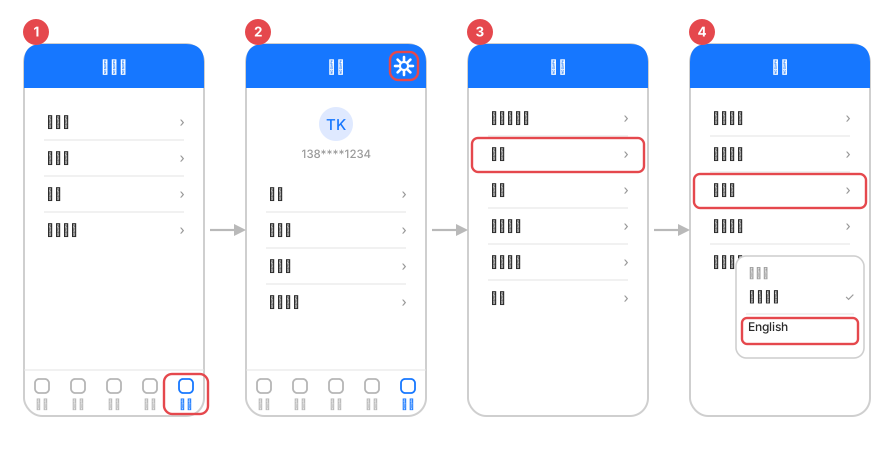
- Tap 我的 (Me) — the bottom-right tab.
- Tap the gear at the top right: 设置 (Settings).
- Tap 通用 (General).
- Tap 多语言 (Language) and choose English — the change is immediate.
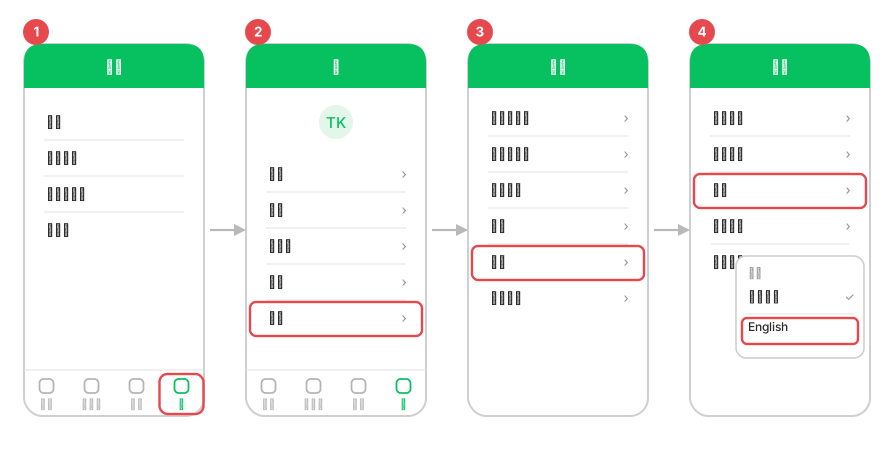
- Tap 我 (Me) — the bottom-right tab.
- Tap 设置 (Settings), the last item on the list.
- Tap 通用 (General).
- Tap 语言 (Language) and choose English.
If your card will not link: TenPayGo
This is the situation that catches people, and it is worth knowing the third option before you need it. TenPayGo is a payment app built by the WeChat Pay team specifically for visitors to China, launched in September 2026. You register with nothing more than an email address — no phone number, no Chinese bank card — and you can link an international bank card, an Apple Pay card, or an overseas e-wallet. It is available on both the App Store and Google Play, and it works across the same merchant network as WeChat Pay.
It also carries a few things visitors keep asking for: AI translation you can hold up to a menu or a road sign, and a QR transit card for city buses and metro that launched with Shenzhen's system, with more cities to follow. Those extra features are newer and are still rolling out city by city — treat them as a bonus, not the reason to install it.
My advice: set up Alipay first, because it is the one you will see on the most counters. Keep TenPayGo in reserve for the moment a card is being rejected for no reason you can see.
So what does using them cost?
That depends on the app, your card and your bank, and the rules are set by them rather than by me — they have been adjusted more than once in the past couple of years. I am not going to quote you a figure, because a number I write down today becomes a number you treat as a promise. Look at the confirmation screen inside the app before you commit to a payment; it shows what that particular transaction costs. Your own card issuer is a separate question — ask them what they charge for a foreign transaction.
Cash, and the card in your wallet
Cash still works and is still money, and I would not arrive with none of it — a small amount covers the moments when a signal, a phone or a card does not cooperate. Day to day, though, you will barely use it.
A plastic card is the fallback, not the plan. Where cards are taken, acceptance runs UnionPay, then Visa, then Mastercard — the opposite order to most people's wallets. For the wider picture, including why cash has all but disappeared here, see how you pay for things in China.
The apps that will not work
The payment apps will work. Some of your other apps will not: Google's, in particular, do not run here by default, which takes maps, mail and the app store with it. That is a puzzle with a solution rather than a crisis, and the sane moment to sort it out is the same evening you set up your payments — at home, while your own internet still works.
Is this how I pay you for a trip?
No — keep those two things separate. Everything on this page is about spending money while you are here: meals, tickets, that scarf in the market. How you pay for a trip itself is a different conversation that depends on what you and I agree, and I would rather settle it with you directly than have you assume a method because it is written on a page. Ask me when we talk.
Questions I get on this one
Can I set it up after I land instead?
Do I need a Chinese phone number?
Do I need a Chinese bank account?
What if I have no smartphone at all?
Should I still bring cash?
Is any of this an offer to accept these methods?
Written from setting this up for guests and for myself, not from a bank's leaflet. Rates, limits and features are set by the apps and change — check inside the app before you rely on any figure. Related: paying in China · language · all essentials